|
|
Why Is My Domain on ClientHold and How Can I Fix It?
发布时间:2026-04-16 18:20:51 浏览人数: 7620 次
Why Is My Domain on ClientHold and How Can I Fix It?
1.ClientHold - Unverified Whois Email address
If your domain name is marked as "Not Verified" by checking "My Account > My Products > Domain Name":
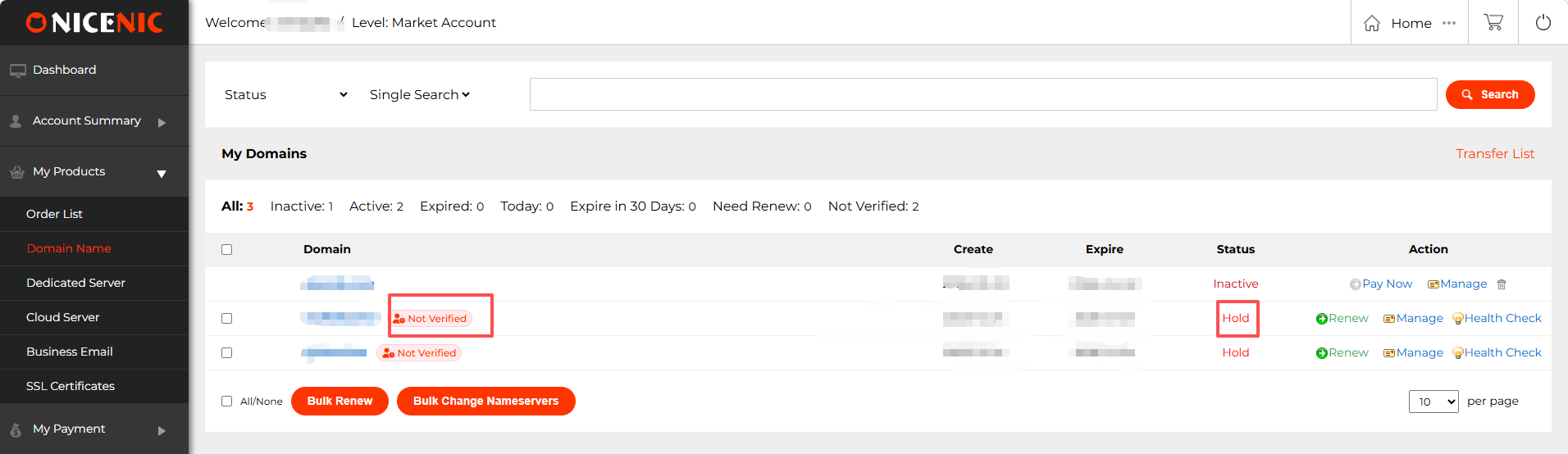 It represents your domain name is clientHold due to Email address verification:
It's ICANN and Registry's annual policy adjustment for all customers on new domain orders.
#1 Please check the inbox or spam folder of the Registrant's Email address and complete the Email verification, once the Email verification goes through, the clientHold status will be removed automatically.
#2 The verification Email will be sent from support@nicenic.net, please add this Email address to your white-labelled Email contact list.
#3 Please ensure that you or your customers would leave valid Email address with our registrar.
#4 You can re-send the verification Email yourself from the domain management panel by "My Account > My Products > Domain Name > Manage > Whois Email Verify: Not Verified Resend: *******@*******.***", just click the link of "Resend: *******@*******.***".
It represents your domain name is clientHold due to Email address verification:
It's ICANN and Registry's annual policy adjustment for all customers on new domain orders.
#1 Please check the inbox or spam folder of the Registrant's Email address and complete the Email verification, once the Email verification goes through, the clientHold status will be removed automatically.
#2 The verification Email will be sent from support@nicenic.net, please add this Email address to your white-labelled Email contact list.
#3 Please ensure that you or your customers would leave valid Email address with our registrar.
#4 You can re-send the verification Email yourself from the domain management panel by "My Account > My Products > Domain Name > Manage > Whois Email Verify: Not Verified Resend: *******@*******.***", just click the link of "Resend: *******@*******.***".
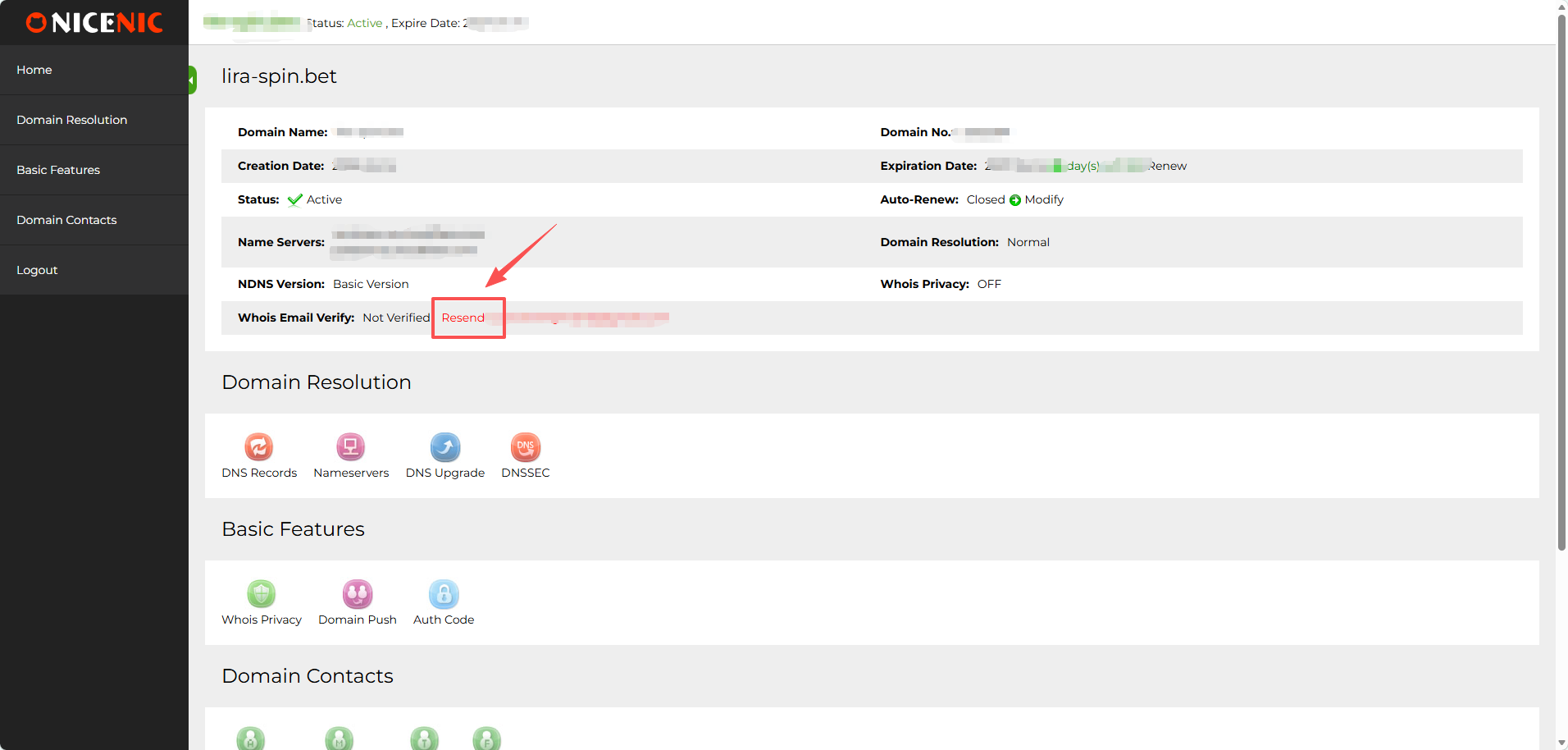 Warm reminder:
For the same email address used across different domains, you only need to complete email verification once. After the first successful verification, any new domains registered under this email will not require additional verification.
If the system still displays the "Email verification" message, please ignore it, as it will not affect the status of your domain, and your domain will not be placed on hold due to email verification.
2.ClientHold - Domain Complained
If your domain name is marked as "Abuse" and "Hold" by checking "My Account > My Products > Domain Name":
Warm reminder:
For the same email address used across different domains, you only need to complete email verification once. After the first successful verification, any new domains registered under this email will not require additional verification.
If the system still displays the "Email verification" message, please ignore it, as it will not affect the status of your domain, and your domain will not be placed on hold due to email verification.
2.ClientHold - Domain Complained
If your domain name is marked as "Abuse" and "Hold" by checking "My Account > My Products > Domain Name":
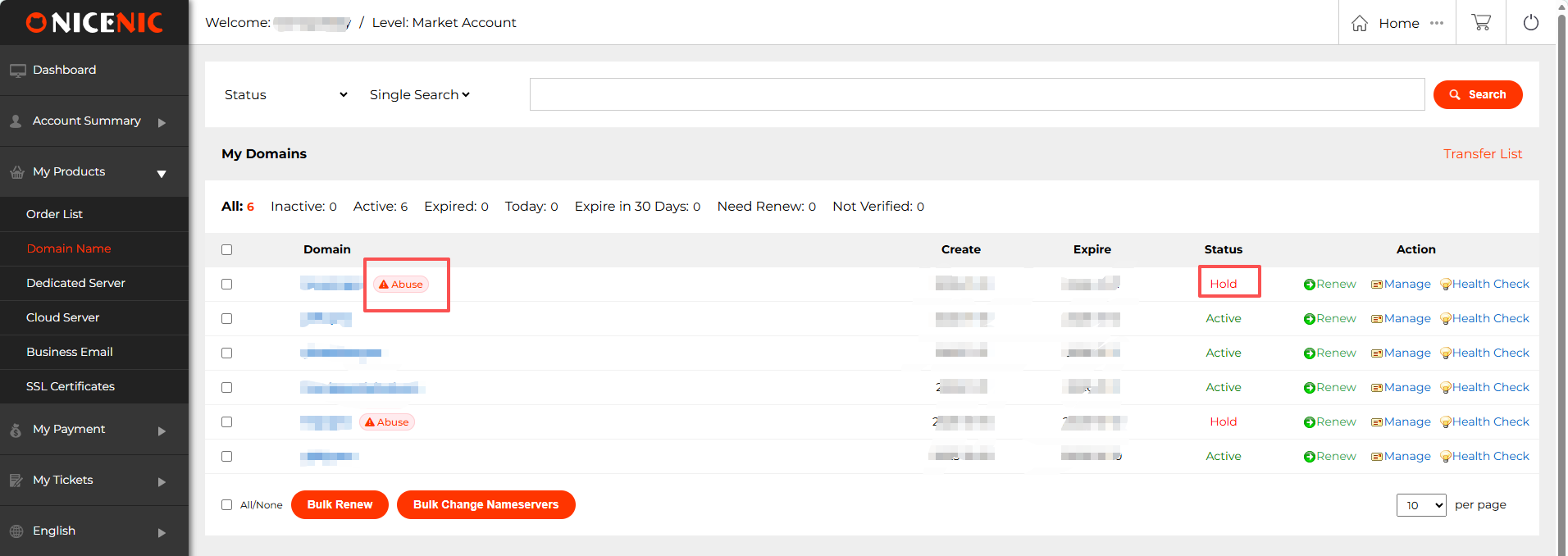 It represents your domain name is clientHold due to abuse report.
To better understand the specific reason for the suspension, please check your control panel for the Abuse summary. Please follow these steps:
1. My Account > My Products > Domain Name
2. Click on Abuse (red triangle icon next to the domain) > Abuse Complaint > Complaint Summary Report
3. If the summary report has not been generated, click on "Generate Summary".
It represents your domain name is clientHold due to abuse report.
To better understand the specific reason for the suspension, please check your control panel for the Abuse summary. Please follow these steps:
1. My Account > My Products > Domain Name
2. Click on Abuse (red triangle icon next to the domain) > Abuse Complaint > Complaint Summary Report
3. If the summary report has not been generated, click on "Generate Summary".
看不明白该文挡,发信息给我们:
|





 返回
返回 打印
打印 提问
提问


