
=
Why Is My Domain on ServerHold? Official Registry Checks and Next Steps
发布时间:2025-04-24 10:34:43   浏览人数: 12227 次  

Why Is My Domain on ServerHold? Official Registry Checks and Next Steps


This article explains common registry-related reasons for serverHold and points affected registrants to the official verification resources published or required by the relevant registry operator. It does not offer suspension-bypass services, does not override registry decisions, and does not replace applicable registry rules, ICANN policies, or legal requirements.

Please do not mischaracterize this page as a suspension-removal service. NiceNIC is summarizing official registry or reputation-check instructions so registrants can understand the next required step.

If your domain was recently flagged by Spamhaus, SURBL, VirusTotal, Norton, URLScan.io, or another reputation system before or after being placed on serverHold, you may also read our related guide: "why a new domain may be flagged by Spamhaus or SURBL".


#1 serverHold by .TOP Registry
If your .top domain name is serverHold by Registry of TOP, please check the Registry's validation requirement through the link below:
https://check.spamhaus.org/results/?query=beststuff.top
Then send Email to abuse@nic.top.

#2 serverHold by Radix

If your domain name is serverHold by Registry of Radix, please check the link for unsuspension: https://abuse.radix.website/unsuspension

Domain names managed by Radix:

  • .online
  • .site
  • .website
  • .store
  • .tech
  • .fun
  • .space
  • .press
  • .host
  • .pw
  • .uno


#3 serverHold by ShortDOT
If your domain name is serverHold by Registry of ShortDOT, please check the link for unsuspension: https://shortdot.bond/removeserverhold/ and/or Email abuse@nic.icu. Domain names managed by ShortDOT:

  • .icu 
  • .cyou
  • .cfd
  • .sbs
  • .bond

#4 serverHold by XYZ Registry

If your domain name is serverHold by Registry of XYZ Registry, please check the link for unsuspension: https://gen.xyz/account/submitticket.php?action=unsuspend and/or Email xyz_abuse@gen.xyz.

Domain names managed by XYZ Registry:

  • .xyz
  • .lol
  • .lat
  • .skin
  • .homes
  • .autos
  • .pics
  • .mom
  • .monster
  • .quest
  • .ae.org
  • .br.com
  • .cn.com
  • .com.de
  • .de.com
  • .eu.com
  • .gb.net
  • .hu.net
  • .se.net
  • .uk.com
  • .uk.net
  • .us.com
  • .us.org
  • .jpn.com
  • .mex.com

Before submitting a review request, it is helpful to understand what reputation systems usually check. For more background, see our guide on "Spamhaus or SURBL domain flagging reasons".

Official registry verification steps for affected domains
Please follow the Registry's instructions below:
1)  Enable your registrant email address for SpamHaus verification:
My Account -- My Products --  Domain Name --  Manage --  Whois Privacy -- ....
(Please temporarily disable privacy or reveal the email as required)

2)  Check the Registry's validation requirement through the link below:
https://check.spamhaus.org/results/?query=your domain

3) Click on "More Info"
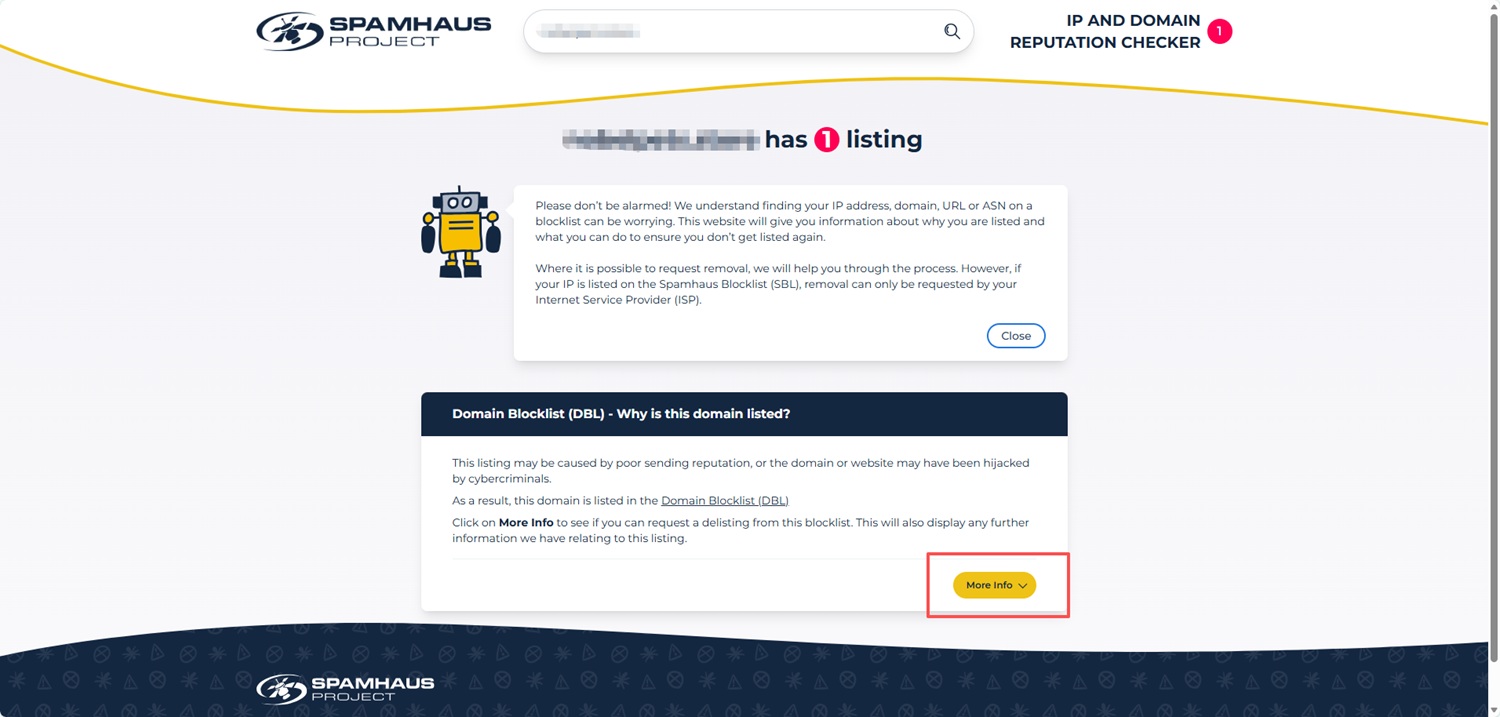

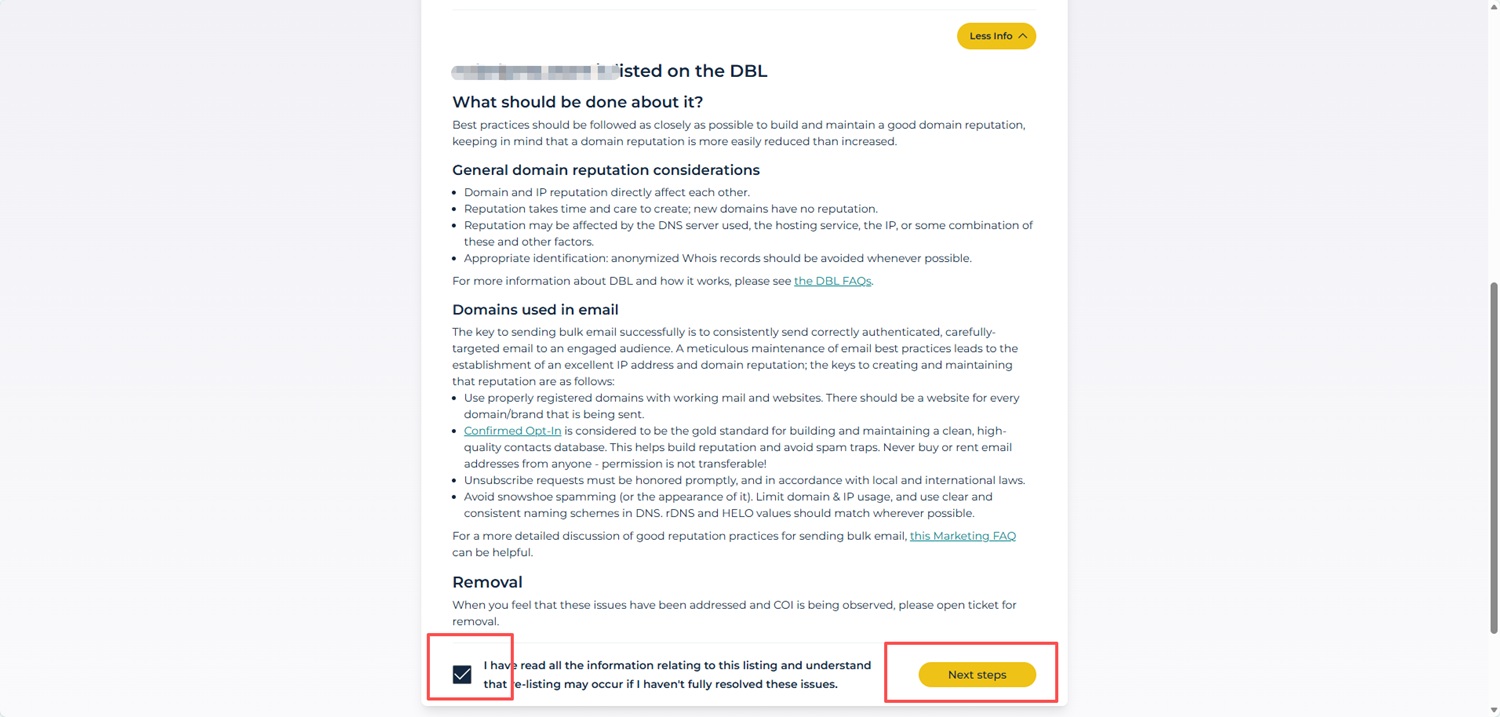
4) After expanding the details, scroll down the page. Then Tick this checkbox, click the "Next steps" button.

5) Complete the Verification Form
Fill in:  Full Name    Email Address    Confirm Email
Then click Submit.
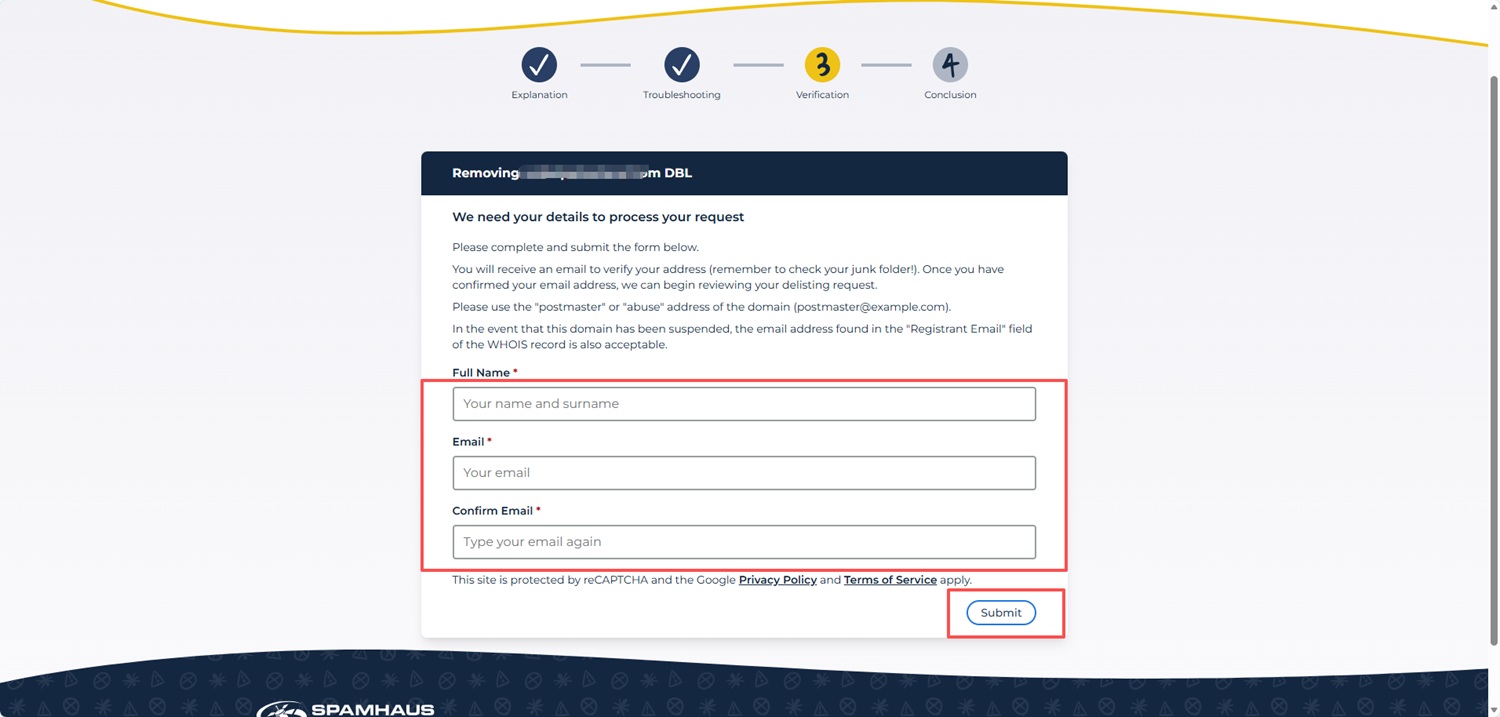

PS: If you do not see the "Next steps" button, please ensure you have first clicked "More Info" and scrolled to the bottom of the page.

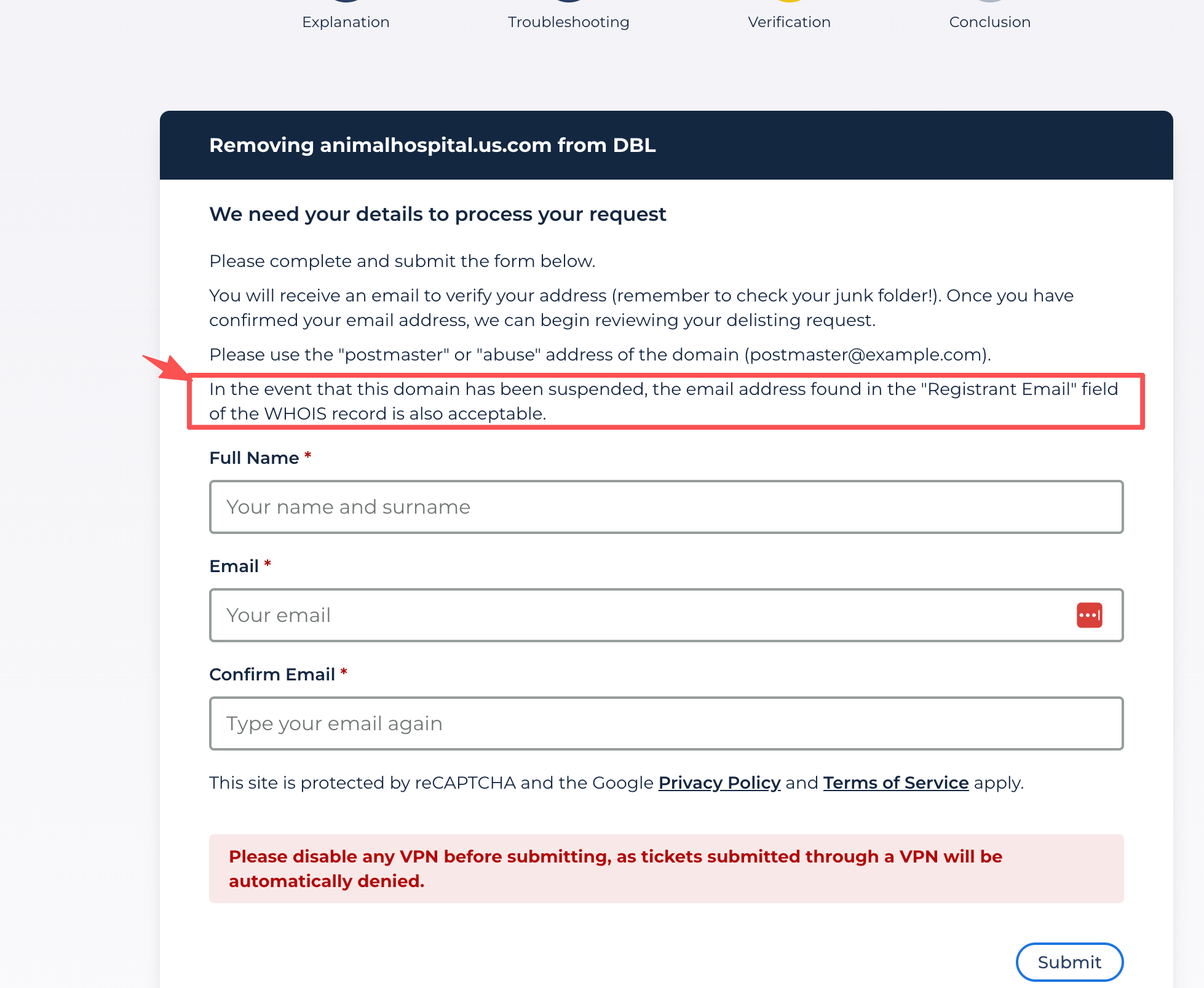
As stated on the form:
"In the event that this domain has been suspended, the email address found in the ‘Registrant Email’ field of the WHOIS record is also acceptable."
This means that if the domain is currently under serverHold and the domain-based email address cannot be used normally, you may use the Registrant Email shown in the WHOIS record to submit the request.
The serverHold status affects the domain’s DNS resolution, but it does not mean that the WHOIS registrant contact email cannot be used for verification. Therefore, please use the registrant email address listed in the WHOIS record to complete the form and wait for the verification email.

Unfortunately, the issue cannot be resolved from our registrar end as this part is entirely controlled by the Registry, not a Registrar as NiceNIC. We recommend you contact the Registries directly as they normally process such kinds of issues with the Registrant's (Your) involvement. You can reach out to the registries via the links mentioned above.

For clarity, we would also like to explain how such Registry-level holds are triggered:
The serverHold status were applied by the Registry following automated detections by reputation services such as Spamhaus or SURBL.
These detections are based on indicators observed at the individual domain's website and hosting level, such as website content, scripts, outbound links, or server-side configurations.They do not indicate that NiceNIC, or domains registered with NiceNIC as a whole, have been flagged or listed by Spamhaus or any other reputation provider.
Accordingly, this status applies only to the specific domain and its associated nameservers or hosting configuration, and is not related to the domain registration service or registrar operations provided by NiceNIC.

For clarity, we would also like to explain how such Registry-level holds are triggered:
The serverHold status may be applied by the Registry following automated detections by reputation services such as Spamhaus or SURBL. To better understand these signals, read our guide on "why domains are flagged by Spamhaus, SURBL, or other reputation systems".


Attention: Reputation-based detections are applied on a per-domain basis and do not reflect the reputation of the registrar.
看不明白该文挡,发信息给我们:
用户: * 密码: * (需要登陆
标题:
内容:

查询关键词字:   
Why Is My Domain on ServerHold? Official Registry Checks and Next Steps
发布时间:2025-04-24 10:34:43   浏览人数: 12227 次  

Why Is My Domain on ServerHold? Official Registry Checks and Next Steps


This article explains common registry-related reasons for serverHold and points affected registrants to the official verification resources published or required by the relevant registry operator. It does not offer suspension-bypass services, does not override registry decisions, and does not replace applicable registry rules, ICANN policies, or legal requirements.

Please do not mischaracterize this page as a suspension-removal service. NiceNIC is summarizing official registry or reputation-check instructions so registrants can understand the next required step.

If your domain was recently flagged by Spamhaus, SURBL, VirusTotal, Norton, URLScan.io, or another reputation system before or after being placed on serverHold, you may also read our related guide: "why a new domain may be flagged by Spamhaus or SURBL".


#1 serverHold by .TOP Registry
If your .top domain name is serverHold by Registry of TOP, please check the Registry's validation requirement through the link below:
https://check.spamhaus.org/results/?query=beststuff.top
Then send Email to abuse@nic.top.

#2 serverHold by Radix

If your domain name is serverHold by Registry of Radix, please check the link for unsuspension: https://abuse.radix.website/unsuspension

Domain names managed by Radix:

  • .online
  • .site
  • .website
  • .store
  • .tech
  • .fun
  • .space
  • .press
  • .host
  • .pw
  • .uno


#3 serverHold by ShortDOT
If your domain name is serverHold by Registry of ShortDOT, please check the link for unsuspension: https://shortdot.bond/removeserverhold/ and/or Email abuse@nic.icu. Domain names managed by ShortDOT:

  • .icu 
  • .cyou
  • .cfd
  • .sbs
  • .bond

#4 serverHold by XYZ Registry

If your domain name is serverHold by Registry of XYZ Registry, please check the link for unsuspension: https://gen.xyz/account/submitticket.php?action=unsuspend and/or Email xyz_abuse@gen.xyz.

Domain names managed by XYZ Registry:

  • .xyz
  • .lol
  • .lat
  • .skin
  • .homes
  • .autos
  • .pics
  • .mom
  • .monster
  • .quest
  • .ae.org
  • .br.com
  • .cn.com
  • .com.de
  • .de.com
  • .eu.com
  • .gb.net
  • .hu.net
  • .se.net
  • .uk.com
  • .uk.net
  • .us.com
  • .us.org
  • .jpn.com
  • .mex.com

Before submitting a review request, it is helpful to understand what reputation systems usually check. For more background, see our guide on "Spamhaus or SURBL domain flagging reasons".

Official registry verification steps for affected domains
Please follow the Registry's instructions below:
1)  Enable your registrant email address for SpamHaus verification:
My Account -- My Products --  Domain Name --  Manage --  Whois Privacy -- ....
(Please temporarily disable privacy or reveal the email as required)

2)  Check the Registry's validation requirement through the link below:
https://check.spamhaus.org/results/?query=your domain

3) Click on "More Info"


4) After expanding the details, scroll down the page. Then Tick this checkbox, click the "Next steps" button.


5) Complete the Verification Form
Fill in:  Full Name    Email Address    Confirm Email
Then click Submit.


PS: If you do not see the "Next steps" button, please ensure you have first clicked "More Info" and scrolled to the bottom of the page.

As stated on the form:
"In the event that this domain has been suspended, the email address found in the ‘Registrant Email’ field of the WHOIS record is also acceptable."
This means that if the domain is currently under serverHold and the domain-based email address cannot be used normally, you may use the Registrant Email shown in the WHOIS record to submit the request.
The serverHold status affects the domain’s DNS resolution, but it does not mean that the WHOIS registrant contact email cannot be used for verification. Therefore, please use the registrant email address listed in the WHOIS record to complete the form and wait for the verification email.


Unfortunately, the issue cannot be resolved from our registrar end as this part is entirely controlled by the Registry, not a Registrar as NiceNIC. We recommend you contact the Registries directly as they normally process such kinds of issues with the Registrant's (Your) involvement. You can reach out to the registries via the links mentioned above.

For clarity, we would also like to explain how such Registry-level holds are triggered:
The serverHold status were applied by the Registry following automated detections by reputation services such as Spamhaus or SURBL.
These detections are based on indicators observed at the individual domain's website and hosting level, such as website content, scripts, outbound links, or server-side configurations.They do not indicate that NiceNIC, or domains registered with NiceNIC as a whole, have been flagged or listed by Spamhaus or any other reputation provider.
Accordingly, this status applies only to the specific domain and its associated nameservers or hosting configuration, and is not related to the domain registration service or registrar operations provided by NiceNIC.

For clarity, we would also like to explain how such Registry-level holds are triggered:
The serverHold status may be applied by the Registry following automated detections by reputation services such as Spamhaus or SURBL. To better understand these signals, read our guide on "why domains are flagged by Spamhaus, SURBL, or other reputation systems".


Attention: Reputation-based detections are applied on a per-domain basis and do not reflect the reputation of the registrar.
看不明白该文挡,发信息给我们:
用户: * 密码: * (需要登陆
标题:
内容:

联系我们

销售电话(400-151-5798)

售后服务(3366365-808)

服务邮箱(service@xpp.cn)

加盟QQ(1405520588)

微信公众号
关于我们

中华人民共和国增值电信业务经营许可证: B2-20150291

小胖传播 ? 版权所有 Copyright ? 2000-2026 XPP.cn. All rights reserved  备案号码:粤ICP备17140174号

声明:本网站中所使用到的其他各种版权内容,包括但不限于文章、图片、视频、音频、字体等内容版权归原作者所有,如权利所有人发现,请及时告知,以便我们删除版权内容

小胖传播 ? 版权所有 Copyright ? 2000-2017 NiceNIC.net,Inc. All rights reserved  备案号:粤ICP备17140174号

声明:本网站中所使用到的其他各种版权内容,包括但不限于文章、图片、视频、音频、字体等内容版权归原作者所有,如权利所有人发现,请及时告知,以便我们删除版权内容

产品

域名注册 软文代写 海报设计
多词推 品牌推 全球推
媒体营销 微博营销 微信营销 论坛营销 视频营销